Free link in bio for creators and small businesses
Create a free link in bio with WhatsApp, products, forms, and reviews on one page to turn profile visits into messages, bookings, and orders.
Create free link in bio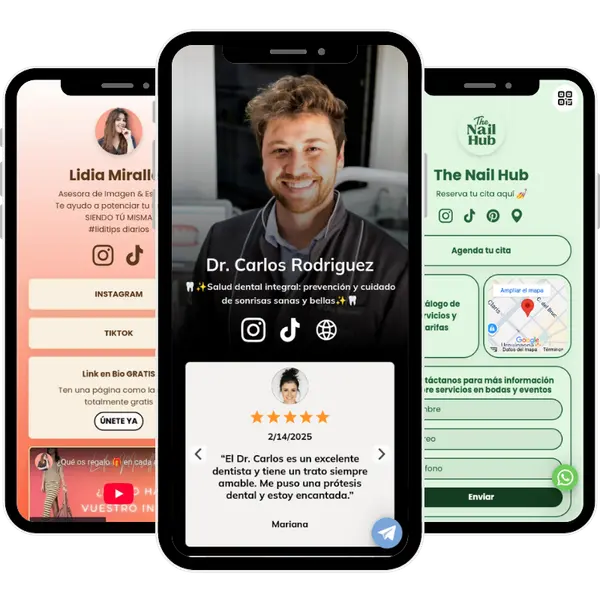
What is a link in bio?
A link in bio is a simple page that brings links, contact options, products, and actions together in one URL for Instagram, TikTok, and other social profiles.
Why use a link in bio
Use a link in bio to move visitors to the next step: message you, book, buy, subscribe, or visit your business.
Where a link in bio works best
Use it on Instagram, TikTok, YouTube, WhatsApp, creator profiles, local business listings, and QR traffic.
Who benefits most?
Creators, freelancers, restaurants, beauty salons, service businesses, coaches, and local brands.
When to use a link in bio instead of a website
Choose a link in bio when you need a fast page for Instagram, TikTok, and other social traffic. Choose a website when you need multiple pages, deeper SEO, and structured navigation.
What is atom.bio link in bio?
atom.bio is a free link in bio tool for creators and businesses that turns profile visits into actions like WhatsApp messages, orders, bookings, and contacts.
Need a full concept guide? Read the full guide: what is link in bio.
If you want to gather all your social profiles in one shareable link, see how to put all your social media links in one place.
Why choose atom.bio as your link in bio tool
If you only need a simple links list, many tools can work. atom.bio makes more sense when you need WhatsApp, products, reviews, maps, forms, and clearer next actions on one page.
More than a basic links page, even on the free plan
Add links, WhatsApp, products, reviews, maps, forms, analytics, and QR without starting with a stripped-down page.
Built for small businesses and creators
Not just social links. Use one page for orders, bookings, inquiries, local visits, and contact capture.
Customize quickly without design friction
Adjust layout, colors, fonts, background, sections, and button style quickly so your page matches your brand.
Built for action, not just for links
Mix WhatsApp, products, forms, maps, reviews, and offers so visitors can move from discovery to action in fewer taps.
A better fit for multilingual teams
Use atom.bio in Spanish, English, and Portuguese, with product and support flows designed for multilingual teams.
Start with the free plan and upgrade only if needed. Create your free link in bio page.
What makes atom.bio different from other link in bio tools?
A clear comparison to choose a tool that does more than show links and can generate messages, orders, and contacts.
| Feature | atom.bio | Other link in bio tools |
|---|---|---|
| Create free link in bio | Yes | Yes |
| Useful features from the free plan | WhatsApp, products, forms, reviews, maps, analytics, and QR | Often limited or paywalled early |
| WhatsApp, bookings, and order actions | Yes | Rare or add-on |
| Products, services, and trust signals on one page | Yes | Usually limited or split across tools |
| Custom domain and branding control as you grow | Yes | Varies |
Need deeper comparison? Compare the best Linktree alternatives.
What you can add to your link in bio page
Choose blocks based on what you want customers to do next.
For more messages
Use WhatsApp, phone, email, and inquiry forms so visitors can contact you without friction.
WhatsApp · Contact buttons · Inquiry formsFor more sales
Show products, catalog sections, and clear order flows so visitors can move from browsing to buying.
Products · Catalog · Offers · Order actionsFor WhatsApp multi-product orders
Enable a WhatsApp cart so customers can select multiple products and send one combined order message — useful for food businesses, retail, and service providers that collect orders through chat.
WhatsApp cart · Multi-product orders · Order flowFor more trust
Add reviews, map, and opening hours so customers can verify your business fast.
Reviews · Map · Opening hoursFor better distribution
Use social links and QR to distribute your page across profiles, flyers, menus, packaging, and offline touchpoints.
Social links · QR · External destinationsAnalytics and optimization
Track visits and clicks so you can improve wording, offers, and block order based on real behavior.
Analytics · Click tracking · ImprovementsFor example, a salon can combine WhatsApp, services, reviews, opening hours, and map in one page to convert profile visits into bookings.
Need more detail? Explore all link in bio blocks and features.
Link in bio for your type of business
Start with the category page here. Move to a more specific guide only when your traffic or use case really needs it.
Link in bio for Instagram
Turn profile traffic into actions with one page for links, contact, offers, and content destinations.
See the Instagram link in bio guideLink in bio for TikTok
Handle fast traffic spikes with a focused page for high-priority actions and conversion blocks.
See the TikTok link in bio guideLink in bio for creators
Use one profile link for content, collaborations, products, and direct contact.
See the creator link in bio guideLink in bio for local businesses
Combine WhatsApp, map, opening hours, reviews, and services to convert profile visits into calls, bookings, and store visits.
See the small-business link in bio guideLink in bio for online stores and catalogs
Show products, pricing context, and clear order actions for visitors coming from social posts or QR scans.
See digital catalog examplesLink in bio for service businesses
Use service blocks, testimonials, and inquiry forms so prospects understand your offer and contact you with context.
See service business page exampleNeed a broader setup than a single page? Create a simple business website. If you need products and WhatsApp ordering, see digital catalog examples for WhatsApp orders.
Quick guide to choose your page
Use this quick guide to pick the best page to start with, then adjust it to where your visitors come from.
| If most visitors come from | Best page to start | First action to show |
|---|---|---|
| Creator profiles (Instagram, TikTok, YouTube) | Creator page | Featured content, main offer, or newsletter |
| Local search and service traffic | Small-business page | WhatsApp or booking button |
| Product traffic from social media | Product page | Best products and clear order path |
| Mixed traffic that needs more trust | Reviews page | Contact action with reviews nearby |
How to create your link in bio
Simple steps to create your page in minutes and improve it over time with real click data.
Step 1
Create your free page and define your main objective: messages, orders, leads, bookings, or traffic to external links.
Step 2
Choose your layout and visual style, then customize colors, fonts, and background so your page matches your brand.
Step 3
Add your main link and conversion blocks like WhatsApp, products, forms, map, reviews, or booking links.
Step 4
Order your blocks so the most important action appears first for profile visitors.
Step 5
Publish and place the URL in your social profiles, WhatsApp, and other discovery points where people find your brand.
Step 6
Review visits and clicks, then improve wording, block order, and offers based on what users actually tap.
Before you publish
1. Check if the first view is clear
Can someone understand the next step in under 3 seconds?
2. Place trust signals near your main button
Keep reviews or trust signals close to your main CTA. If trust is key in your case, review the reviews page.
3. Check the mobile tap flow and page order
Test it on your phone and make sure priority actions are obvious, easy to tap, and ordered around your main traffic, especially in WhatsApp-first pages.
Examples of link in bio pages
See real page patterns used by small businesses, local brands, and creators to drive messages, visits, bookings, and sales from one profile link.
Creator link in bio example
A creator setup that combines content links, social channels, collaborations, and affiliate destinations in one clear flow.
See creator link in bio examplesLocal business link in bio example
A local-business setup with map, hours, reviews, services, and WhatsApp so profile visitors can become real local demand.
See local business page examplesCatalog and product link in bio example
A catalog setup with products, prices, and order actions, plus QR and analytics for ongoing optimization and distribution.
See product and catalog examplesWant to browse more real pages? See real link in bio examples.
All these patterns can start on the free plan.
What users say about atom.bio
These are real customer quotes from our reviews page, adapted for each language.

I can show all my services and links in one place
atom.bio helps me show all my services and links in a profile that reflects my brand and connects me with clients. Since I added WhatsApp access, I receive more service inquiries and communicate more easily.
Helped me improve traffic and sales
After adding my product links in atom.bio, I noticed more traffic and sales on my website. I recommend it to any business that wants to improve online visibility and conversion.

Best free platform
It lets you add your links in one place and offers design variety for a more personalized page. The best part is that it is free and does not require payment details to keep your page.
Link in bio FAQs
Direct answers to common questions before you create your page.
A link in bio is one page that groups your key links and actions in one place for your social profiles. It matters because profile visitors can move faster to the next step: message, book, buy, or contact.
The free plan lets you create and publish a full link in bio page with WhatsApp, products, reviews, map, forms, analytics, and QR. The premium plan is mainly for removing atom.bio branding, connecting a custom domain, and accessing advanced design and profile options.
The best option depends on your goals. If you only need a basic links list, many tools can work. If you need stronger business actions like WhatsApp, products, forms, map, reviews, and analytics, atom.bio is usually a better fit.
Yes. You can place your atom.bio URL in social profiles and update the page anytime. It works well on platforms like Instagram and TikTok, but the page is not limited to one network.
Links, WhatsApp, products, forms, reviews, map, opening hours, videos, files, analytics, and QR.
Yes. With WhatsApp cart enabled, visitors can add multiple products and send one combined order message. This is useful for food, retail, and service businesses that collect orders or requests through chat.
Yes. You can connect or purchase a custom domain in settings so your page can run without the atom.bio root domain.
Yes. atom.bio includes analytics so you can see visits, clicks, and what sections receive the most engagement.
Yes. A link in bio is a focused single page, so you can start without building a full website. You can move to a website later when you need multiple pages and deeper content structure.
Linktree is the most well-known link in bio tool. It works well for basic links lists. atom.bio is a strong alternative when you need WhatsApp contact, product cards, reviews, maps, forms, and local-business conversion, not just a list of links.
Yes. You can download a QR that opens your page and use it on flyers, tables, packaging, or cards.
Yes. You can remove atom.bio branding with a premium plan.
Most users can publish a working page in minutes and improve it over time as they learn from analytics.
Learn more about link in bio
Compare, learn, and choose the right link in bio setup.
What is link in bio?
Read the full concept guide with practical examples and use cases.
Read the link in bio guideBest Linktree alternatives
See where atom.bio fits when you compare other link in bio tools.
Compare Linktree alternativesLink in bio blocks and features
Check available blocks and choose the setup that fits your objective.
Explore page blocksCreate your free link in bio now
Start free, publish quickly, and upgrade only when you need more advanced branding control.
Create free link in bio