How to create a link in bio with products: how many to show, what to include, and when to use a catalog
A product-focused link in bio page works when you want a simple way to sell from social traffic without building a full store. It helps visitors scan a curated product selection, understand what matters, and move toward chat, checkout, or inquiry with less friction. This guide explains how many products to show, how to organize the page, and when a digital catalog is the better choice.
Quick answer
- Use a product page when you only need to highlight a curated selection.
- For most social traffic, three to eight products is a strong starting range.
- The page should show a clear order path near the featured products.
- Move to a catalog when browsing depth matters more than fast decision-making.
What is a link in bio page with products?
It is a page designed to help visitors discover a focused set of products and act quickly without getting lost in a full store experience.
This works especially well for Instagram, TikTok, WhatsApp, and other social traffic where the visitor often arrives with limited attention and one product interest already in mind.
If people need categories, wider browsing, or more product depth, the better fit is usually a digital catalog.
If you want the broader page overview first, start with the main link in bio page.
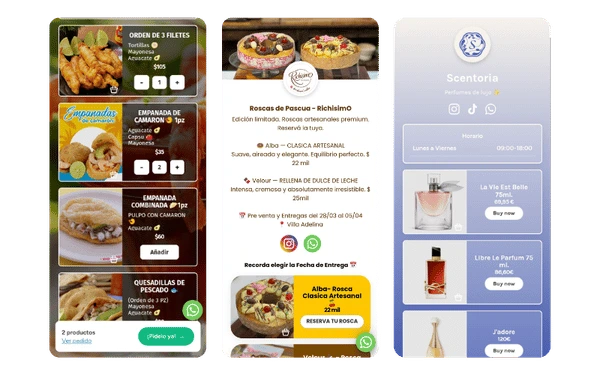
When is a product-focused link in bio page enough?
- You only need to show a curated set of products This works best when you are featuring best sellers, launches, limited offers, or a small set of products that deserve more attention.
- The next step is simple If visitors can move into WhatsApp, checkout, or direct inquiry without needing lots of comparison first, a focused product page is usually enough.
- Your traffic comes from social profiles and posts This format is especially useful when visitors arrive from Instagram or TikTok already interested in one offer, product family, or promotion.
Decision shortcut: Use a product-focused page when you need fast product discovery and one clear next step. Move to a digital catalog when browsing depth becomes part of the buying process.
How many products should you show on a link in bio page?
- Cold traffic usually works best with fewer products If visitors are arriving from broad social traffic and do not know your full offer yet, start closer to three strong products so the page stays clear.
- Warmer traffic can handle a wider selection If people already know the brand or arrive from product-specific posts, five to eight products often still feel easy to scan.
- More products make sense only when browsing is part of the goal If the page needs categories, deeper comparison, or long exploration, you are moving from product page logic into catalog logic.
- The right number depends on attention, not only on inventory A page should match how the visitor arrives. Social traffic often needs a clearer selection, while returning traffic can handle more options.
What is the ideal structure for a link in bio page with products?
The best product pages make one thing easy: understand the offer and act. A simple structure usually converts better than a page that mixes too many product blocks with no visual hierarchy.
| Section | What it should do | Why it matters |
|---|---|---|
| Hero with clear CTA | Explain the main offer and show the first next step | Helps social traffic understand fast what the page is for |
| Featured products | Show three to five key products first | Keeps attention on the offers most likely to convert |
| Trust signal | Add reviews, ratings, or reassurance near the products | Reduces doubt before the action |
| Primary order path | Use WhatsApp, checkout, or inquiry where it is easy to find | Makes the next step obvious |
| Secondary products or extra info | Leave supporting products, delivery notes, or FAQs lower on the page | Prevents the top of the page from feeling crowded |
Default rule: If you are not sure where to start, use hero, three to five featured products, one trust block, and one clear CTA before adding anything else.
What should a link in bio page with products include?
-
1
Lead with the products most likely to convert
Start with the products people are most ready to buy, ask about, or compare, not with your full inventory.
-
2
Use one clear buying path
Choose the simplest next step for the business: WhatsApp, checkout, order form, or direct inquiry. The page should not make visitors guess how to buy.
-
3
Add enough product context to decide
Use short descriptions, price context, and one clear reason to care. The goal is to help visitors decide, not to overload them with every detail.
-
4
Keep the page visually easy to scan
If products keep growing, compare the page with a digital catalog before the page starts acting like a messy store substitute.
When should you show a curated product selection instead of a full catalog?
- Use a curated selection when you want fast product decisions This is best for social traffic, launches, seasonal campaigns, and pages where one small group of products should dominate attention.
- Use a catalog when exploration matters more than speed A catalog fits better when people need categories, many items, filters, or deeper comparison before they choose.
- Split into categories only when the visitor really needs it Extra structure helps when product variety is high, but it adds friction when the page only needs a few strong offers.
- Do not confuse selection with inventory size Even if you sell many products overall, your link in bio page can still work better as a curated product page if the traffic is coming for one specific theme or campaign.
Practical rule: If visitors should decide fast, curate. If visitors should explore, catalog.
Which product-focused link in bio layouts work best?
Direct-sale layout
Use a short product selection with checkout or order CTA close to each featured offer when the buying path is simple and fast.
This works best when visitors do not need many questions answered before buying.
If the page still needs a broader block mix, compare it with the available page blocks.
Conversational layout
Use products plus WhatsApp when buyers often need to ask about size, availability, delivery, customization, or order details before purchasing.
This layout works well when conversation is part of the buying process, not a sign of friction.
If chat is the main order path, compare this structure with a link in bio with WhatsApp.
Trust-first layout
Use products plus reviews when visitors need more reassurance before buying, especially for higher-friction or higher-trust offers.
This is often stronger than simply adding more product tiles with no trust nearby.
For that structure, compare with the Instagram guide and the small-business version.
Link in bio with products vs digital catalog
| Decision point | Product-focused link in bio | Digital catalog |
|---|---|---|
| Best for | A curated product selection and one clear next step | Broader browsing and deeper product exploration |
| Expected conversion style | Faster decisions on fewer offers | Longer exploration before the decision |
| User type | Visitors from social posts, profiles, and campaigns | Visitors ready to compare more products |
| Friction | Lower if the selection is clear | Higher, but useful when more browsing is needed |
| When to upgrade | When the page starts feeling crowded or limited | When products become the center of the full experience |
If visitors need categories, broader comparison, or more time to decide, the digital catalog is usually the better long-term format.
For deeper product architecture, compare this setup with the digital catalog solution and all page blocks and features.
What mistakes make a product-focused link in bio page weaker?
- Showing too many products too early When everything appears at once, visitors often scan less, decide less, and leave faster.
- Giving every product the same visual weight A page converts better when featured products stand out and secondary items stay secondary.
- Using a weak or unclear order path If visitors cannot tell whether they should buy, ask, or order through WhatsApp, the page creates friction at the exact moment it should be clear.
- Turning the page into a poor substitute for a full catalog When the page starts acting like a full store but without the right structure, both browsing and conversion usually get worse.
Frequently asked questions about link in bio pages with products
How many products should I show on a link in bio page?
For most social traffic, showing three to eight products is a strong starting point. Add more only when visitors truly need broader browsing.
What should a link in bio page with products include?
It should include featured products, short product context, one clear CTA, and trust or support elements near the main action.
When should I use a product page instead of a digital catalog?
Use a product page when you want to highlight a curated selection with one clear next step. Use a catalog when people need categories, more products, or deeper browsing.
Can I sell products and use WhatsApp on the same page?
Yes. That setup works especially well when buyers often need to ask about availability, delivery, sizing, or custom details before buying.
Should I show prices on the page?
Show prices when they help people decide faster. Hide them only when the offer is custom and a quote is the real next step.
What should visitors see first after they tap the link?
They should see the product, collection, or offer that matches the post or profile they came from, plus one clear way to buy or ask.
Create a product page optimized for social conversion
Build a product-focused page that helps visitors discover the right offers fast, trust what they see, and move into chat, checkout, or inquiry with less friction.
Create your product page