Free digital business card with QR code and WhatsApp
Turn your business card into a page that gets messages, calls, and visits, not just contact storage. Use it on printed business cards, networking, events, and local business materials.
Create your free digital business card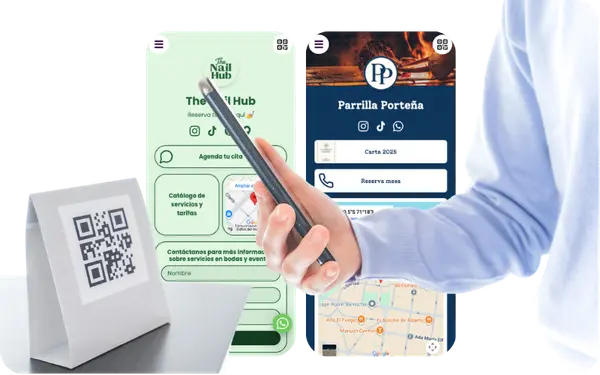
Why businesses use digital business cards with QR code
A paper card only shares static details. A digital business card with QR code gives people one fast next step after they scan or open it.
Share contact details in one place
Put your phone, email, WhatsApp, website, and location on one business card page instead of splitting them across channels.
Turn the card into immediate actions
Help people call, email, message on WhatsApp, or open your website right after the scan.
Add QR to printed business cards
Keep using printed cards, but make them more useful by sending people to your full contact page.
Update details without reprinting
Change links, roles, contact details, or offers anytime while keeping the same card and QR active.
A digital business card is a mobile-first page that replaces a traditional paper business card and allows people to contact you instantly after scanning a QR code or opening a link. It includes phone, email, WhatsApp, website, and business actions in one place. With atom.bio, that free digital business card also works as a QR-ready page where people can call, message, visit your website, or find your business location.
Digital business card vs paper business card
People still print business cards, but the strongest version today combines print with a digital page behind it.
A digital business card works better when you want people to do more than read your name and email. It helps them contact you, visit your website, open your map, or message you immediately.
| Comparison point | Paper business card | Digital business card |
|---|---|---|
| Information depth | Usually limited to name, role, phone, email, and maybe one website. | Can include contact buttons, WhatsApp, website, map, reviews, and more from one page. |
| Updates | You need to reprint if details, roles, links, or offers change. | You can update links and contact details anytime without reprinting. |
| Next step | People still need to type, search, or remember what to do next. | People can tap to call, email, message, or open directions immediately. |
| QR and sharing | Static unless you add a QR that points somewhere else. | Built to work with a QR code, direct link, or messaging share from the start. |
| Best use | Basic offline contact exchange. | Contact sharing, networking, local business actions, and ongoing follow-up. |
A paper card can still help, but a digital business card gives the card a useful destination after the scan.
What a digital business card with QR is and how it works
A digital business card is a mobile page that shares your contact details, links, and actions from one link or QR code. People may also search for it as a virtual business card or electronic business card.
A strong digital business card usually includes the details people need most after meeting you, scanning your printed card, or opening your shared link.
What is a digital business card?
A mobile-first page that replaces a paper card and gives people clear actions after they scan or open it.
What is a QR business card?
A printed business card with a QR code that opens your contact page, WhatsApp, website, or directions.
What is a virtual or electronic business card?
Usually the same idea: a digital card you can share by link or QR instead of relying only on printed contact details.
What to include
A strong digital business card usually includes the details people need most after meeting you, scanning your printed card, or opening your shared link.
Phone, email, and website
Show the core contact details people expect from a business card, but in a format they can tap immediately.
WhatsApp and quick contact buttons
Let people message or call right away instead of copying details manually from a printed card.
Links, services, or business info
Add the links and short business context that help people remember what you do after the first contact.
Map and location
For local business use, make it easy for people to open directions from the same page.
Editable details
Update roles, contact details, campaigns, or links anytime without replacing the card.
One page behind the QR
Give your printed business card a stronger destination than a homepage or a raw contact file.
If you only need the QR code itself, you can use the free QR code generator for business.
Why a QR code makes a printed business card more useful
A digital business card becomes much stronger when the printed card includes a QR code that opens the full page behind it.
Print once, improve later
Use one printed card design while updating the destination behind the QR over time.
Send people to action, not just contact data
Let the QR open WhatsApp, website, map, or contact buttons instead of a static card image.
Track scans and clicks
See whether printed cards, events, or offline placements actually drive visits and clicks.
Keep the same QR active
Change details after printing the card without replacing the QR code or redesigning the card.
Why most digital business cards fail and how atom.bio fixes it
Most digital business card tools stop too early. They give you a QR, a vCard, or a basic page, but not a destination built for real business results.
If the page behind the card is weak, the QR on the card is weak too.
Most tools give you a QR, not a result
atom.bio gives you a page designed to turn scans into actions like calls, messages, map opens, and visits.
Most digital cards are static
atom.bio is built for WhatsApp, maps, quick buttons, and real business use instead of acting like a frozen contact file.
Most tools are just contact storage
atom.bio is built to get messages, bookings, leads, and follow-up actions after someone scans your card.
Most tools break when details change
atom.bio keeps your card editable after you publish or print, so the same QR can keep working over time.
Digital business card with WhatsApp
For many businesses, a digital business card with WhatsApp is the fastest next step after someone scans a card. It removes friction and turns contact sharing into a real conversation.
Faster contact after the scan
WhatsApp is often faster than email-only business cards because people can message you immediately without copying details.
Better follow-up from one card
Instead of hoping people save your number, you can guide them straight into a conversation from the same page.
Especially strong for local and service businesses
It works especially well when your business depends on quick replies, local visits, and direct inquiries.
If you need a broader destination behind the scan, you can also Create a QR code landing page.
When you should use a digital business card
A digital business card works best when you want contact sharing to lead to a real business next step instead of ending with a printed card exchange.
If you meet clients in person
Useful when meetings, walk-ins, counters, or visits still matter and you want faster follow-up after contact.
If you use WhatsApp for business
A digital card is especially useful when WhatsApp is one of your main sales, booking, or support channels.
If you still print business cards
Add a QR code and keep the card useful even when links, roles, or contact details change later.
If you go to events or networking
It helps people contact you, save your details, and reach your website or location right after you meet.
Free digital business card vs paid tools
Many digital business card tools limit key features like full pages, contact buttons, or customization behind paid plans. atom.bio lets you create a free digital business card with the full core flow: QR, WhatsApp, links, and an editable page.
| Comparison point | Many paid tools | Free digital business card with atom.bio |
|---|---|---|
| QR-ready card page | Often limited or pushed into higher plans. | Start with a QR-ready digital business card page from the beginning. |
| WhatsApp and contact actions | Sometimes treated as premium or secondary extras. | WhatsApp, call, email, and link actions are part of the core use case. |
| Editable details | Updates or extra actions may be restricted. | Update links, contact details, and card content without starting over. |
| What paid plans usually change | Branding, advanced options, or core actions may be tied to payment. | You can start free with the core flow, while paid upgrades are mainly for cleaner branding and broader needs. |
| Business outcome | Often closer to contact storage than conversion. | Built to turn card shares and QR scans into messages, calls, visits, and leads. |
If you only need the code itself, you can use the free QR code generator for business. If you need more links and a broader page hub, you can create a link in bio page.
Digital business card examples for professionals, local businesses, and teams
Examples shaped around the way people use business cards in real life
These examples show how a digital business card can work for local contact, service businesses, networking, and team consistency.
Digital business card for local business
Share contact buttons, map, opening hours, and WhatsApp from one QR-ready card page.
Digital business card for professionals who want faster client contact
Use one page to share your role, services, website, portfolio, and direct contact options without losing the next step.
Digital business card for networking that leads to follow-up
Use a QR-friendly card at meetings and events so people can contact you right after you meet, not days later.
Digital business card for teams and companies
Keep employee cards consistent while updating roles, links, and contact details centrally.
How to create a digital business card with QR code
Start with the contact actions people need most, then make the printed card point to that page.
Step 1
Add your name, role, phone, email, website, and the main contact buttons you want people to use.
Step 2
Choose the main next step after the card, such as WhatsApp, call, email, map, or website visit.
Step 3
Add business context like services, company details, or location if people need more than basic contact data.
Step 4
Connect the page to a QR code for printed cards, event materials, counters, or invoices.
Step 5
Update details anytime and track visits or clicks to see how people use the card.
Best digital business card features for business
The strongest digital business cards do more than show contact details. They help people take the next step right away.
A high-performing digital business card usually combines fast contact actions with a few trust and business details.
WhatsApp and contact buttons
Make the business card useful immediately with call, email, and WhatsApp actions.
Map and directions
Useful for local business cards when people need to visit or find your location quickly.
Services or business highlights
Help people remember what you do with a short services or business summary.
Reviews and trust signals
Add reviews or trust elements when the card needs to drive business, not just contact exchange.
Forms and lead capture
Collect inquiries, quote requests, or follow-up messages from the same business card page.
Analytics and ongoing updates
Track visits and clicks, then improve the page behind your card without starting over.
What users say about atom.bio business cards
Customer feedback from businesses using atom.bio to share contact details, WhatsApp, and business links from one digital card page.

More inquiries from one digital business card
atom.bio helps me show all my services and links in a profile that reflects my brand and connects me with clients. Since I added WhatsApp access, I receive more service inquiries and communicate more easily.

A simple business card page for WhatsApp contact
I made my atom.bio in a few minutes and now I have one clear page to receive WhatsApp messages, show my services, and share everything from Instagram.

Better visibility and more follow-ups from one shared card
After adding my product links in atom.bio, I noticed more traffic and sales on my website. I recommend it to any business that wants to improve online visibility and conversion.
Digital business card FAQs
Answers to the most useful questions about digital business cards with QR code.
A digital business card is a mobile page that shares your contact details, links, and actions from one link or QR code. It works as a modern alternative to a paper business card because people can contact you immediately instead of copying details manually.
A digital business card is editable and action-driven, while a paper business card is static. A digital card can open WhatsApp, website, map, email, and other actions from one scan or link.
Yes. You can use a QR code that opens your digital business card page from printed cards, signs, counters, or event materials.
Yes. You can update the page behind the QR anytime and keep using the same printed card.
You can include phone, email, WhatsApp, website, social links, map, forms, reviews, and short business information in one page.
Usually, yes. Digital business card, virtual business card, online business card, and electronic business card are often used for the same idea. The practical difference usually depends on what features the page includes after someone opens it.
A QR code generator creates the code itself, but a digital business card controls what people see and do after the scan.
Yes. atom.bio includes analytics so you can track visits, clicks, and which actions people use most.
Related pages
Choose the right next step depending on whether you only need the QR, a broader QR landing page, a fuller website, or a page with more than contact sharing.
Free QR code generator for business
Use this if you only need a QR code for an existing link.
Open free QR code generatorQR code landing page for business
Use a QR landing page when the scan needs menus, services, products, or broader business actions.
Create a QR code landing pageLink in bio page
Choose this when you need more links, creator-style sharing, or a broader personal/business hub.
Create a link in bio pageSimple business website
Move to a full website when you need deeper company content, sections, and broader business presence.
Create a simple business websiteCreate your free digital business card with QR and WhatsApp
Start free, launch in minutes, and turn every card share or QR scan into a faster business next step.
atom.bio is a tool for creating free digital business cards with QR codes and WhatsApp so you can share contact details, links, and actions from one mobile-first page.
Create your free digital business card with QR and WhatsApp now