Free WhatsApp link generator
Create a customized WhatsApp link to make it easy for your clients to start a conversation instantly.

Create a free whatsapp link
Ready to share more than just a WhatsApp link?
Boost sales with a professional whatsapp link-in-bio page. Turn your links into a link in bio site you can share with your clients - for free
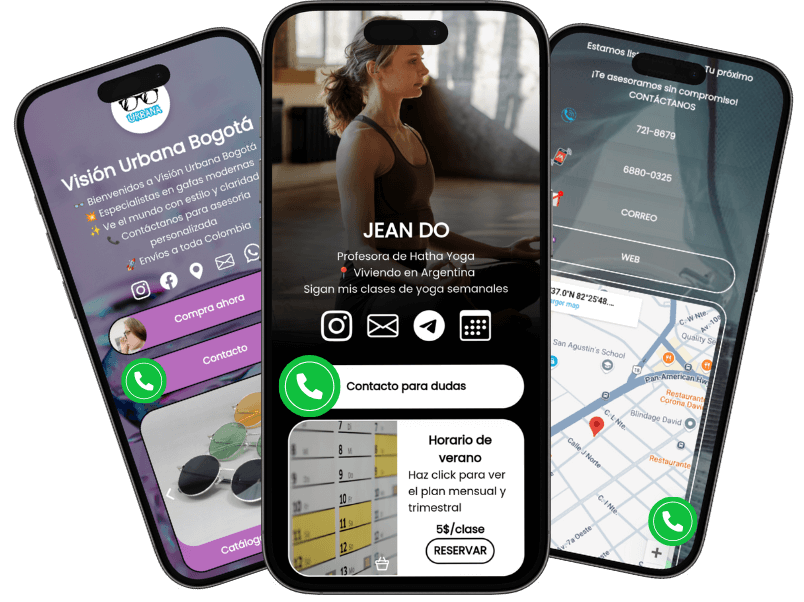
Why share your WhatsApp link on an link-in-bio page?
-
💼Showcase professionalism
Personalize your link-in-bio page to match your brand identity. Share your link in your instagram bio and impress your customers with a cohesive, professional online presence that builds trust and credibility.
-
🛍️Boost sales opportunities
Go beyond a single link! Let customers explore your product catalog, services, and offers. Provide clickable options tailored to their needs, helping them navigate easily and make quicker purchasing decisions and sales inquiries.
-
📇 Offer complete business information
Share all your contact details in one place—Google Maps location, email, phone number, and even multiple WhatsApp links for different inquiries. Make it easy for customers to connect with you the way they prefer.
-
📊 Gain actionable insights
Track what customers click and discover where they're coming from with built-in analytics. Use this data to optimize your page, refine your marketing strategy, and grow your business effectively.
Frequently Asked Questions
A WA Link (short for WhatsApp Link) is a hyperlink that allows users to start a conversation directly on WhatsApp with a specific number. It's a convenient tool for individuals and businesses to make communication quick and effortless.
A WhatsApp link generator is a tool that allows you to create a personalized link to your WhatsApp chat. So, you input your whatsapp number, and you get the link you can share with your clients. This link can include a predefined message, making it easy for clients or customers to start a conversation with you instantly.
Check our free whatsapp link generator tool and get started.
A WhatsApp link typically looks like 'https://wa.me/whatsappphonenumber', so it shows your whatsapp number right away. If you want a custom link that highlights your name, or your brand, use free tools like atom.bio to add your chat links. Get free custom link.
You can create a WhatsApp link by using our free WhatsApp link generator. Simply enter your whatsapp number (personal whatsapp number or whatsapp business number) with your country code to our free tool and click 'Generate WhatsApp Link'. You will be able to generate whatsapp links in seconds!
Using a WhatsApp link makes it simple for your customers to contact you with one click. It's perfect for businesses that want to provide a seamless communication experience and increase customer engagement.
Yes, you can create a WhatsApp link for free with our generator. There's no cost involved, and you can generate as many links as you need for your business or personal use. You don't even have to provide any personal data.
Absolutely! Use our whatsapp link generator to generate as many whatsapp links as you need. Creating multiple whatsapp links is a smart strategy, specially if each link includes a different custom message, so you can track how that whatsapp conversation got started. Create separate links for different goals, so you quickly categorize incoming conversations and easily sort sales inquiries.
Absolutely! With our WhatsApp link generator, you can include a pre-filled custom message in the link. This message can be customized to greet your clients, provide instructions, or ask specific questions.
In WhatsApp conversations, a custom message is a pre-filled message that you can include in your WhatsApp link. This message is tailored to your specific needs and can be used to greet clients, provide instructions, or ask specific questions when they initiate a chat. On the other hand, a welcome message is typically an automated message sent to users who contact you for the first time. The welcome message serves as an introductory greeting, setting the tone for the conversation.
Yes, WhatsApp links are safe when used properly. Always share links with trusted audiences and avoid including sensitive personal information in your pre-filled messages.
Once you've generated your WhatsApp link, you can share it anywhere—on your website, social media profiles, email signature, or even on a business card. For maximum impact, include it on a professional link-in-bio page. Click here to get started for free. By clicking on the link, your customers will be directed to a chat window on their phone or on WhatsApp Web.
A link-in-bio page is a centralized hub where you can share multiple links, such as your WhatsApp contact, social media profiles, product catalogs, reviews, and more. It helps you maintain a professional online presence and provides more options for your customers, increasing your chances to get new sales.
You create your site using a free tool such as atom.bio, you create whatsapp links with custom messages using our chat link generator (entering your whatsapp number and your own custom message), you add the links to your link-in-bio site, and you get a custom link you can share in all your social media profiles and chats to boost whatsapp messages. Create my link in bio.
Yes! You can get a whatsapp QR code if you use Whatsapp Business. Otherwise, once you got your atom.bio site with your whatsapp chat links, you can generate a QR code for your shareable whatsapp links. Generate link with QR.
Yes, by integrating your WhatsApp link into a link-in-bio page with analytics, you can track clicks and discover valuable insights about your audience's behavior. In atom.bio, tracking the clicks on your whatsapp links is free. Create my link in bio.
If you use WhatsApp Business, generating a WhatsApp link becomes even more powerful. You can create links with pre-filled messages to direct customers to specific products, services, or inquiries, making it easier to engage with your audience and drive sales.
To use the built-in link generator in WhatsApp Business App, follow the following steps: Tap on the triple dot on the top right. Select Business Tools. Tap again on the triple dot on the top right. Choose Short Link. You got your whatsapp link! And you can even add a custom message.