Link in bio for TikTok: how to add it, why it may not show, and what page works best
TikTok's help center currently says you can add a website if you have 1000 followers or more, or a Registered Business Account. Availability can still vary by region, account type, and app rollout. Once the link appears, the page behind it matters a lot because TikTok profile visits are rarer and people decide quickly. This guide explains why the field may not show, how to add it, and what kind of page works best once people tap.
Quick answer
- TikTok does not give every account the website link immediately.
- TikTok's help center currently says you can add a website with 1000 followers or more, or a Registered Business Account, but availability can still vary by region, account type, and app rollout.
- If the link is missing, the first things to check are account type, app version, and regional rollout.
- TikTok is usually one website slot, not Instagram's 5-website profile model.
- Because TikTok profile visits are rarer and more video-dependent, the page should match the video and lead with one obvious next step.
Can't add a link on TikTok? Do this first: Switch to a Business Account, check whether you have reached the follower threshold, update the app, and test again in Edit profile. If you are searching for why you can't add a link in bio on TikTok, these are the first things to check.
When is the TikTok website link available?
Fast answer
- TikTok's help center currently says you can add a website if you have 1000 followers or more, or a Registered Business Account.
- If you do not see it, switch account type, update the app, and check again in Edit profile.
- Availability can still vary by region, account type, and app rollout, so not every account sees the same setup at the same time.
TikTok's help center currently says you can add a website if you have 1000 followers or more, or a Registered Business Account. In practice, testing a Business Account setup is usually the first move if the field is missing, but the exact availability can still vary by region, account type, and app rollout.
- Treat the rule as practical, not universal Do not assume every account will see the same setup at the same time. TikTok changes eligibility and rollout details more often than many users expect.
- Testing a Business Account setup is usually the first practical step TikTok's business materials position link in bio, contact information, and lead tools as business-account features, so switching account type is often the fastest thing to try.
- Some business setups may ask for registration details If TikTok asks for proof of business registration during setup, treat that as part of the platform's business-account flow rather than a problem with the page you plan to link.
- Availability is only the first step Once the website slot appears, the bigger question is what you do with it. TikTok traffic is impatient, so the page has to remove decisions, not add more of them.
Practical takeaway: For TikTok, the challenge is not only choosing the page. It is first getting access to the website-link slot, then using that rare profile click well once you have it.
What is a TikTok link in bio and why does that click matter?
A TikTok link in bio is the page people reach after they open your profile and tap the website link on your account when that field is available. It can send people to a product page, booking flow, WhatsApp, or a page built for that specific tap.
That click matters because fewer people reach the profile in the first place, and they usually arrive from one specific video. If the destination feels slow, generic, or unrelated to what that video promised, you lose one of the few moments when TikTok traffic is ready to act.
If you want the broader overview first, start with the main link in bio guide.
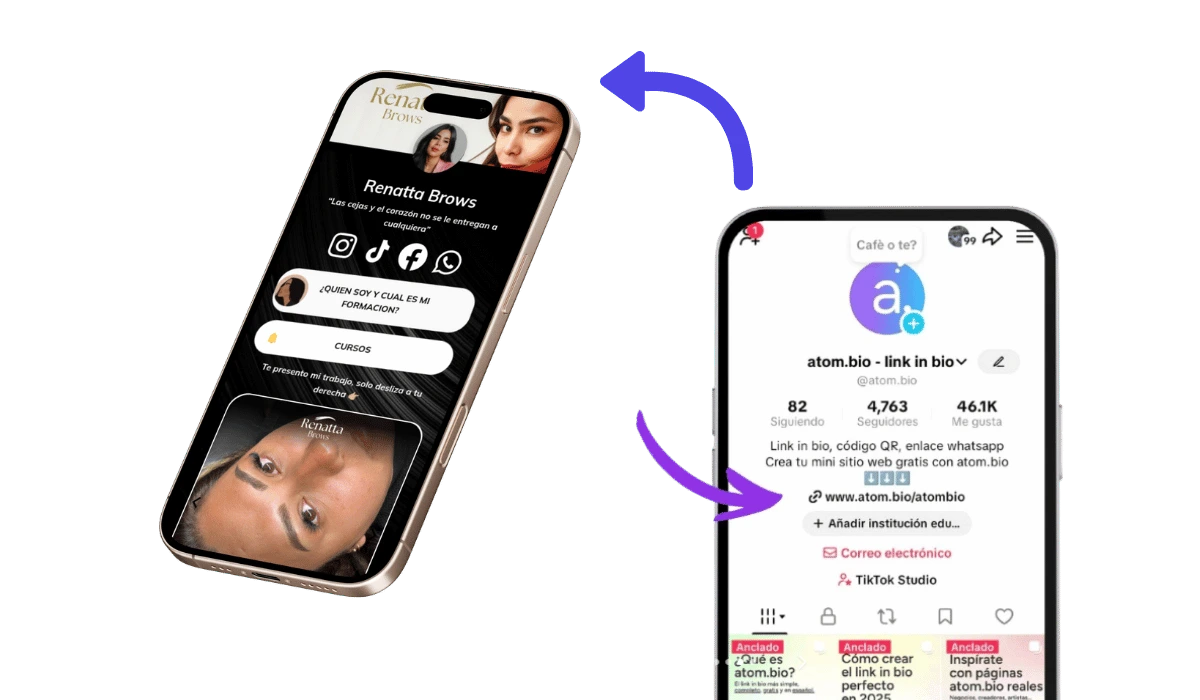
Why is your TikTok website link not showing?
If you are searching for why you can't add a link in bio on TikTok, why the TikTok bio link is missing, or how to get the link in bio option, the most common cause is simple: the account does not have access to the website field yet.
Your account may not be eligible yet
If the website field is missing, the most common reason is that TikTok has not enabled it for that account yet.
Your account type may be limiting access
If you are still on a personal account, switching to a Business Account is usually the first thing to test.
Your region or app version may not match the current rollout
TikTok itself notes that some link features are not available everywhere, so update the app and check again before assuming the option is gone.
You may be expecting Instagram-style linking
TikTok is usually built around one website slot plus social profile links, not a multi-website profile setup like Instagram.
How to add your link in bio on TikTok
Once the website field is available, the setup itself is short. The main thing is to add the right page and test it on mobile right away.
-
1
Open the TikTok account you want to edit
Go to the profile where you want the website link to appear.
-
2
Open Edit profile and check the website field
If you do not see a website option, test a Business Account first and check again.
-
3
Add the final page you want TikTok traffic to reach
If the video is about one product, the page should open on that product. If the video is about booking or messaging, that action should be first.
-
4
Save and test the page on mobile
Open the profile again and make sure the page loads fast, matches the video context, and shows one obvious next step at the top.
-
5
Check the first button or link title
If the first thing people see is vague, like Website or More, the page is probably not ready yet.

TikTok's exact menu path can shift a little by app version, but the principle does not change: this setup is usually done in the mobile app, and once the link is available you should review the page from your phone and make sure the first visible action matches the video that drove the tap.
Can you add multiple links on TikTok?
TikTok's profile setup is usually centered on one website link, plus social account links like Instagram or YouTube. That is different from Instagram, which now allows up to 5 profile websites. Because TikTok usually concentrates the profile around one website slot, it helps to make that click count instead of sending people to a generic destination.
Those social links are useful, but they do not replace the website slot. The website field is still the main place for one external destination you control.
| Platform | How many website links can you add? | What is usually the best setup? |
|---|---|---|
| TikTok | Usually one website link, plus social profile links like Instagram or YouTube | One page that matches the video and makes the next step obvious |
| Up to 5 profile websites | Either several links or one guided page, depending on how much help people need |
In simple terms: TikTok usually gives you one main website spot, so the page behind that link matters more. Instagram gives you more profile links, so the choice is more about whether several links are enough or whether one guided page would still work better.
If Instagram is also a major traffic source for you, compare this with the Instagram guide.
What should a TikTok link in bio page include?
Match the page to the video that drove the click. If the video is about one product, the page should open on that product. If the video is about booking, messaging, or one offer, that action should be first. TikTok clicks drop fast when people do not immediately see what they expected.
If your video is about one product, your link page should open on that exact product, not a generic list of links. If the video is about one service, the page should lead straight to booking, message, or the next clear action.
For creators
Lead with the thing the audience just cared about: one featured video, newsletter, drop, or collab path. A lot of creator pages fail because the first link says nothing about the content people just watched.
- Featured video, drop, or latest campaign
- Subscribe or join CTA
- Collaboration contact or media kit
- Store or monetized destination
If your page is creator-first, compare this with the creator guide and real published pages in the gallery.
For product or TikTok Shop traffic
TikTok already has stronger in-app shopping than many other platforms, so your bio page should support the buying decision instead of repeating the whole store. If the video is about one item, open on that item or collection first.
- Featured product or collection first
- Price, offer, or buying context
- Reviews or proof
- Secondary support like shipping, bundle, or FAQs
If your main traffic also depends on Instagram profile behavior, compare this with the Instagram guide.
For local services or appointment-based businesses
If a video makes people want to ask, book, or check availability, your first visible action should be WhatsApp or booking. Map, reviews, and price clues help, but they usually support the decision rather than start it.
- Book now or WhatsApp first
- Short service or offer context
- Reviews or proof
- Map, area served, or pricing clue
If the whole profile behaves like a small-business front desk, see the small-business guide.
For affiliates, educators, or lead generation
Cold TikTok traffic usually needs one obvious promise first: get the guide, join the list, book the call, or open the recommended resource. If the first button could apply to any business, it is too vague.
- Lead magnet or primary offer first
- Short credibility cue
- Form, booking, or newsletter CTA
- Only the most relevant extra destination below
TikTok vs Instagram link in bio strategy
| Decision point | TikTok | |
|---|---|---|
| Profile traffic intent | Usually more discovery-driven and tied to individual videos | Usually more profile-driven and steady |
| Traffic pattern | Bursty after individual videos | More stable across the profile |
| Profile link model | Usually one website slot | Up to 5 profile websites |
| Best page style | Fast, specific, matched to the video | Can support broader profile decisions and multiple paths |
TikTok usually produces more volatile, video-dependent traffic, so the bio click needs a faster, more specific page.
Should TikTok traffic go to TikTok Shop, a homepage, or a page matched to the video?
| Scenario | Best choice | Why |
|---|---|---|
| One product already selling inside TikTok Shop | TikTok Shop or product page | Keep the path short if the user is already ready to buy in-platform |
| Service, booking, or message-first offer | Guided link in bio page | These clicks usually need one obvious action, not a full homepage menu |
| General brand awareness only | Homepage can work | Fine when there is no single conversion path to prioritize |
| One viral video driving rare profile clicks | Guided link in bio page | Best when the page continues the promise of that one video and removes extra choices |
Sending TikTok traffic to a homepage usually fails when the visitor has no reason to explore. A page matched to the video works better when it highlights the one action the video already made relevant.
If you want real structures to compare before building, review real published pages in the gallery.
Frequently asked questions about link in bio for TikTok
How do I get a website link on TikTok?
TikTok's help center says you can add a website if you have 1000 followers or more, or a Registered Business Account. If the field is missing, testing a Business Account setup, updating the app, and checking again in Edit profile are usually the first things to try.
Why is my TikTok website link not showing?
The most common reasons are account eligibility, account type, regional rollout, or app-version differences. The fastest thing to test is usually switching to a Business Account and checking the profile editor again.
Can I add multiple links to my TikTok bio?
TikTok usually gives you one website slot plus social account links, not an Instagram-style group of several website links. That is why it helps to use that slot for one clearer page instead of sending people to a generic destination.
Should I use TikTok Shop or a link in bio page?
Use TikTok Shop when the in-app buying path is already clear. Use a guided page when the click needs context, comparison, proof, booking, messaging, or a higher-consideration next step.
Can I change my TikTok bio link anytime?
Yes. If you change offers, campaigns, or featured videos often, update the destination so the page still matches the content that drives the click.
What is the best TikTok link in bio for creators?
For most creators, the best page leads with the thing the audience just cared about: a featured video, drop, newsletter, collaboration path, or product. Generic labels like Website usually waste the click.
Can I use the same link in bio page for TikTok and Instagram?
Yes, but the order and copy should still fit the main traffic source. TikTok usually needs a faster, narrower page than Instagram because fewer visitors arrive and they decide faster.
Create a TikTok link page built for the moments when viewers actually tap
Use one page matched to the click to turn rare profile visits into the next action that matters most: a message, booking, sale, signup, or product click.
Create your TikTok page for free