If you’re looking for a tool to put all your links on one page, you’ve probably asked yourself: Linktree vs Beacons, which one is better? Both are popular with creators, entrepreneurs and brands, but they don’t solve quite the same problem.
Quick verdict: Linktree usually fits better if you want a well-known links page built for marketing. Beacons fits better if you’re a creator, influencer or agency and need tools for selling, a media kit, campaigns and brand deals. And if you want something simpler that you can publish fast, without a learning curve, atom.bio, our free link in bio tool, may suit you better.
Below we go through the differences in detail so you can choose for your case. If you want a wider view of similar tools, see our guide to Linktree alternatives. Here we focus on Beacons vs Linktree, and at the end we explain when atom.bio makes sense instead. One note: we didn’t run a hands-on test of Beacons for this post. Plans and prices come from each tool’s official pricing and help pages at the time of writing (October 2026), in US dollars.
Is Linktree or Beacons better?
Linktree: strong for digital marketing
Linktree pioneered the “link in bio” idea. It was founded in 2016 in Melbourne and grew popular thanks to Instagram, which only allowed one link in your bio. With Linktree, people could group many links on one page: their website, shop, social profiles and more. Its use quickly spread far beyond Instagram.
It’s still one of the best-known link in bio tools, but many alternatives have appeared over the years. Some focus on brands that want to sell online from one link; others focus on creators who want a closer connection with their fans. One thing is clear: the days when a link in bio was just a way to add a link to your Instagram or Facebook bio are over.
Linktree has grown with marketers and digital entrepreneurs who want tools to improve conversions and measure results. It started as a basic option, and today it connects with analytics, email and e-commerce platforms. That makes it attractive if you know how to use those tools. Want the basics first? Read our guide to what Linktree is and how it works.
Linktree’s key features
Marketing integrations (some free, the more advanced ones on paid plans):
- Google Analytics and Meta Pixel, to track conversions and improve your ads (Pro and Premium plans).
- Email platforms: contact forms and email sign-ups on your page sync to Mailchimp, Kit, Klaviyo, beehiiv or Google Sheets on Pro and Premium. Exporting sign-ups as a CSV works on every plan.
- E-commerce apps in its marketplace, such as Shopify and Spring, to show products from your page. You still handle shipping yourself.
Built-in ways to earn:
- Selling digital products without a separate website, on the Pro and Premium plans. Linktree takes a seller fee that depends on your plan, and Stripe’s processing fee (typically 2.9% + $0.30 per sale) comes on top.
- Tips through Square’s “Support Me” link.
SEO controls and analytics: the free plan has basic analytics. Pro adds advanced analytics and SEO controls, and Premium adds full analytics.
Price and branding: the free plan has unlimited links, social icons, themes, basic analytics and a QR code for your page. The Linktree logo stays on free pages; hiding it needs Pro or Premium. Paid plans cost around $8 (Starter), $15 (Pro) and $35 (Premium) a month in the US, and yearly billing is cheaper.
Who is Linktree for?
- Marketers and businesses that want data. If you run ad campaigns and need to track conversions with Google Analytics or Meta Pixel, Linktree connects to both (on Pro and Premium).
- Digital entrepreneurs with automated workflows. If your contacts live in an email tool like Mailchimp, Kit or Klaviyo, Linktree can send new sign-ups there.
- E-commerce and creators with digital products. If you sell online, you can sell digital products or connect your shop without building a separate website.
If you’re after a simpler link in bio that gives your business or personal brand what it needs for free, take a look at atom.bio (more below).
Beacons: built for influencers and influencer agencies
Beacons (beacons.ai) arrived as a more modern, all-in-one option, aimed at influencers, content creators and managers who work with several talents. The name says it: it wants to be a “beacon” for creators. Over time it has added AI tools, a store, a media kit and tools to manage creators. It goes beyond a page with buttons: it helps creators present their brand, sell and negotiate with companies.
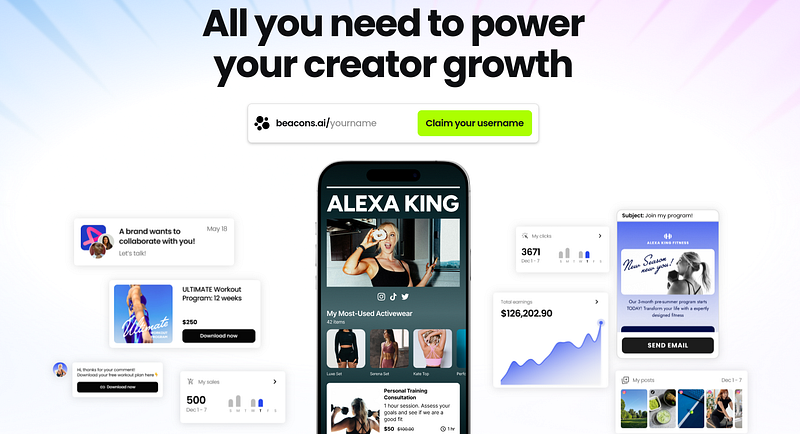
You can sell products to your fans straight from your bio link, and the higher plans add extras like memberships, courses and order bumps. For creators and businesses that want to sell online, that’s more than Linktree offers on its free plan.
Unlike Linktree, Beacons doesn’t just organize links for your bio. It has tools made to manage and earn money with influencers. It’s a strong platform if you negotiate with brands, need performance reports and want to manage campaigns in one place.
Beacons as a Linktree alternative
Beacons is a good Linktree alternative when your links page is part of a creator strategy: showing your stats, working with brands, selling digital products or preparing a media kit. If you only need a simple profile with links, contact details and basic content, Linktree or a simpler alternative can be enough.
Beacons’ key features
- Store: sell digital products from the free plan. Courses and memberships need Creator Plus.
- Media kit: included on the free plan, so you can send brands your audience and stats.
- Email marketing: built in, from 50 sends a month on the free plan to unlimited marketing emails on Creator Plus.
- AI brand outreach: on the Creator plan, to help you pitch brands.
- Tools for managers and agencies: Beacons for Managers offers auto-updating media kits and pitch decks, roster sheets, live campaign reports for brands and a CRM to track every creator, deal and brand. It’s free for a small roster (up to 3 creators), and paid plans scale with the number of creators you manage.
Is Beacons free? Beacons pricing explained
Yes, Beacons has a free plan. These are the creator plans its help center lists at the time of writing:
- Free ($0): unlimited links, up to 5 link in bio pages, a media kit, a store, custom colors, fonts and images, and 50 email sends a month. Sales pay a 9% Beacons fee.
- Creator ($10 a month or $100 a year): 500 email sends a month, email automations, AI brand outreach and a custom domain (free for the first year). Sales still pay 9%, but invoices pay 0%.
- Creator Plus ($30 a month or $300 a year): 0% Beacons fee, unlimited marketing emails, memberships and courses, buy now pay later, order bumps, custom URLs, and no Beacons logo.
- Creator Max ($90 a month or $900 a year): everything above, plus unlimited AI generations, Google Workspace, an NFC card and white glove onboarding and support.
On top of the Beacons fee, the payment processor takes its own cut on every plan: Stripe charges 2.9% + $0.30 per transaction, and PayPal 3.49% plus a fixed fee that depends on the currency.
When does the 9% fee cost more than a paid plan? 9% of $333 is about $30, the price of Creator Plus. So if you sell more than roughly $333 a month through Beacons, Creator Plus costs less than the fee on the free plan. Below that, staying free is cheaper.
Who is Beacons for?
- Influencer agencies and managers. If you manage several talents and need to show data to brands, Beacons automates much of that work, with more features on paid plans.
- Influencers who work with brands. If you want a polished pitch and reports that prove your numbers, Beacons makes negotiating easier.
- Influencer marketing teams. Beacons puts campaign management in one place, which makes working with creators more efficient.
It’s a powerful tool, but it takes longer to learn. If you need something quicker and more intuitive without giving up customization, atom.bio may be the better alternative for you.
atom.bio: a simpler alternative to Beacons and Linktree
If you want to build your links page with a tool that’s easy to use, with no complicated setup and with features that are actually useful, atom.bio is a solid alternative in 2026. Linktree and Beacons have powerful features, but they can feel aimed at advanced marketers or professional creators. We built atom.bio so you can publish a useful page quickly, without tracking codes or automations on day one. More than 1 million users have signed up, and it’s available in English, Spanish, Portuguese and Catalan.
atom.bio’s key features (all on the free plan)
- Full design control: choose colors, backgrounds, gradients, fonts and buttons, add YouTube videos and photo carousels. Pages look good on phones and computers.
- Simple analytics: page views, top links and traffic sources, with no need to set up Google Analytics (you can connect it, and Meta Pixel, if you want).
- A free QR code for your page, to print on cards, menus or flyers.
- Built for businesses: Google Maps, a WhatsApp button and chat bubble, a block to show reviews and ask for new ones, and product catalogs with a WhatsApp order button, with no atom.bio fee on your orders.
To be honest about the trade-offs: free pages show small ads, and atom.bio has no built-in checkout. You can link a buy button to your shop or payment page, but if you sell digital downloads and want the payment to happen on your page, Beacons or Linktree are better for that. Premium removes the ads and emails you when someone fills in your contact form, for $3.99 a month or $29 a year (see atom.bio plans and pricing).
Who is atom.bio for?
- Local and online businesses that need a quick website without paying or dealing with complicated settings.
- Professionals and entrepreneurs who want to show their catalog, location and contact details in one link.
- Creators, artists and influencers who want an eye-catching page without paying for it.
You can create your free atom.bio page in a few minutes.
Detailed comparison: Beacons vs Linktree vs atom.bio
Customization and ease of use matter a lot when you choose a link in bio tool. atom.bio is the simplest of the three and gives you the most design options for free. Linktree and Beacons aren’t hard to use, but it can take a bit longer to understand all their features and get the most out of their integrations and selling tools. Here’s the Linktree vs Beacons comparison side by side, with atom.bio as a third column.
| Feature | atom.bio | Linktree | Beacons |
|---|---|---|---|
| Design (colors, backgrounds, fonts, images) | Yes, free and without limits | Themes and core options free; more control on paid plans | Custom colors, fonts and images on the free plan |
| Traffic analytics (visits, link clicks) | Yes, free: views, clicks, traffic sources, CSV export | Basic on free; advanced on Pro, full on Premium | Click and sales stats |
| WhatsApp as a contact channel | Yes, built for direct contact | As a link | As a link |
| Chat bubble for messages | Yes | No comparable block | No comparable block |
| Show reviews and ask for new ones | Yes | No comparable block | No comparable block |
| Catalogs or sales, and platform fee | Product catalog with WhatsApp orders; no atom.bio fee (no checkout) | Digital products on Pro and Premium, with a seller fee that depends on the plan | Store from the free plan; 9% fee on Free and Creator, 0% from Creator Plus |
| Integrations | Google Analytics and Meta Pixel; no email-tool, CRM or Shopify integrations | Google Analytics, Meta Pixel and email syncs (Mailchimp, Kit, Klaviyo) on Pro and Premium; Shopify and Spring in its marketplace | Email marketing built in; Google Workspace on Creator Max |
| Pitch decks and CRM for agencies | No | No | Yes (Beacons for Managers) |
| Paid plans | Premium $3.99 a month or $29 a year | Starter ~$8, Pro ~$15, Premium ~$35 a month | Creator $10, Creator Plus $30, Creator Max $90 a month |
| Ideal for | Businesses, creators and entrepreneurs who want a simple, fully customizable page | Marketers and businesses with marketing know-how | Influencers, agencies and creator managers |
Conclusion: Linktree vs Beacons, which one is better?
After looking closely at Linktree, Beacons and atom.bio, it’s clear that each one is designed for a different kind of user. There’s no single right answer: the best choice depends on what you need and how much digital marketing experience you have.
- You’re an experienced marketer or digital entrepreneur and need integrations with email marketing, Google Analytics and selling tools: Linktree is a solid option, although many of its best features need a paid plan.
- You work with influencers or run campaigns for creators: Beacons is a powerful alternative, with tools for pitches, campaign reports and a CRM. Its interface can feel more complex, many features are on paid plans, and its free plan takes 9% of your sales.
- You want a simple tool with the essentials to publish fast: atom.bio is a very good alternative. You get easy customization, analytics without complicated setup, WhatsApp, Google Maps, reviews and catalogs with no atom.bio fee on your orders.
Thanks for reading. If you want to compare more tools, see our roundup of the best link in bio tools, or follow our step-by-step guide to create your own link tree.
FAQ about Beacons vs Linktree
Which is better, Linktree or Beacons?
Linktree is usually better if you want a well-known, simple links page with marketing integrations. Beacons is usually better if you’re a creator or an agency and need tools for a media kit, selling, campaign reports and brand deals. Keep in mind that Beacons takes a 9% fee on sales on its Free and Creator plans.
Is Beacons an alternative to Linktree?
Yes. Beacons is a Linktree alternative with a stronger focus on creators, influencers, selling and working with brands. It has a free plan with unlimited links, a store and a media kit, and paid plans from $10 a month at the time of writing (October 2026).
Linktree or Beacons for a small business?
For a small business, Linktree works if you only need links. Beacons can feel like more than you need if you don’t use its creator tools. If you want something simpler, with WhatsApp, reviews and a product catalog, atom.bio may fit better.
What is a good free alternative to Beacons and Linktree?
If you want something easy to set up, atom.bio is a free option for businesses, creators and brands that want a quick page with links, contact details, a catalog, reviews and WhatsApp. Free pages show small ads, which Premium removes for $3.99 a month or $29 a year.
Which Beacons alternative should I use if I want something simpler?
If Beacons feels too focused on professional creators, atom.bio may fit better: it’s a simpler way to build a page with links, WhatsApp, a catalog, reviews and a contact form. If you sell digital downloads and need a checkout on your page, stay with Beacons or Linktree, because atom.bio has no built-in checkout.