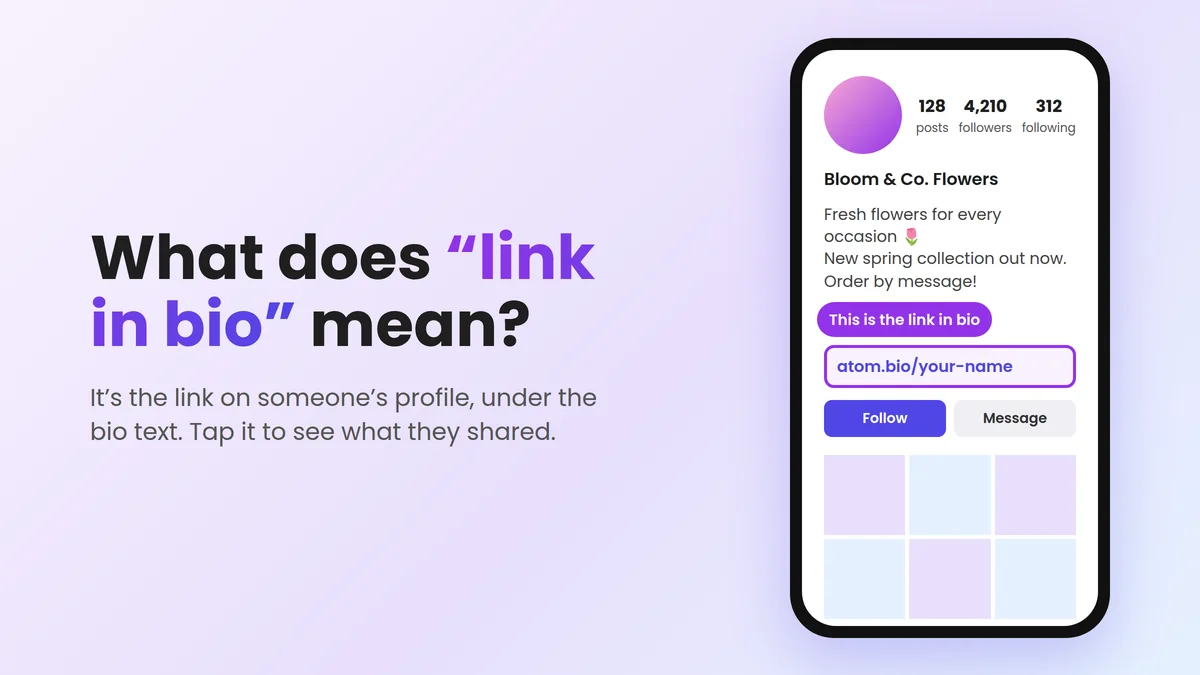
“Link in bio” means that the link is on the person’s profile, under their bio. The bio is the short text at the top of a profile, under the name. When a post says “link in bio”, tap the account name to open the profile. Then tap the link under the bio text.
People write it because links in Instagram and TikTok captions don’t open when you tap them. The profile is one of the few places where a link works.
How to open a link in bio (quick steps)
- Tap the account name or the profile picture on the post or video.
- Find the bio. It is the short text under the name, at the top of the profile.
- Tap the link under the bio. It is often blue or has a small chain icon. If the account has more than one link, tap it to see the full list.
- Choose the right button. Many links open a page with several buttons. Look for the one that matches the post, for example “Shop”, “New video” or “Book now”.
Link in bio meaning, in simple words
“Bio” is short for biography. On social media, the bio is a few lines about the person or business. You see it at the top of every profile.
“Link in bio” is short for “the link is in my bio”. So the post is telling you: “Go to my profile to find the link.”
You may also see:
- “Check link in bio” or “check the link in my bio”: same meaning. Go to the profile and tap the link.
- “Link on bio”: same meaning. The usual phrase is “link in bio”, but both are used.
- “Link in description”: this is mostly used on YouTube. The link is in the text under the video, not on the profile.
What does “check link in bio” mean?
It means “go to my profile and tap the link there”. The link takes you to what the post talks about: a video, a product, an offer, a free download or a sign-up form.
A safety tip: spam and fake accounts often write “check link in bio” in comments to get clicks. If you don’t know the account, don’t log in, pay or download anything from the page that opens.
Why don’t people just put the link in the post?
On Instagram and TikTok, a web address in a caption or comment is plain text. You can’t tap it. A link in the profile can be tapped. That is why people send you to their bio. Instagram Stories are different: there, people can add a link sticker that you tap directly.
Where is the link in bio? Instagram, TikTok, Facebook, YouTube and Threads
Every app shows the link in a similar place: on the profile, just under the bio text. Here are the details for each one.
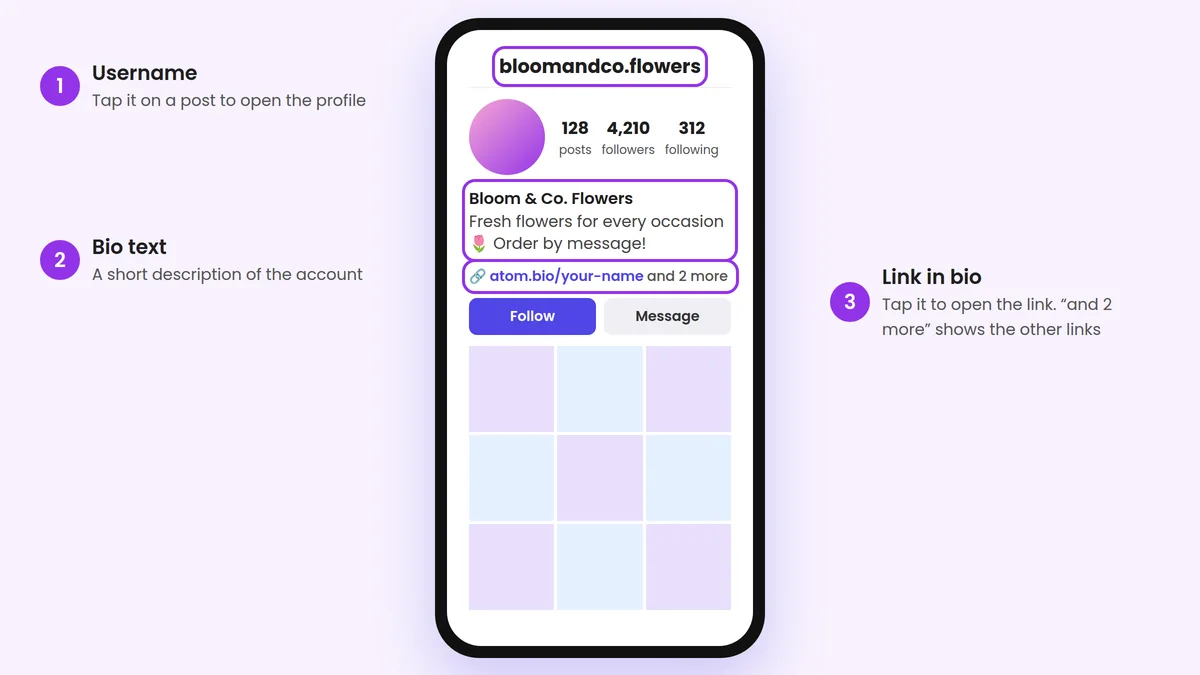
Where is the link in bio on Instagram?
- On a post, tap the username at the top. On a Reel, tap the username at the bottom.
- On the profile, look under the name and the bio text.
- Tap the link. It is above the Follow button.
An Instagram profile can have more than one link. In that case you see the first link and a note that there are more. Tap it to see all of them. On a computer, the link is in the same place, under the bio.
Where is the link in bio on TikTok?
- On the video, tap the profile picture on the right, or the @username at the bottom.
- On the profile, find the bio text under the buttons.
- Tap the link under the bio.
Not every TikTok account can add a clickable link. Some people write their address as plain text in the bio instead. If the address is not blue, you can’t tap it. Press and hold to copy it, or type it into your browser.
Where is the link in bio on Facebook?
Tap the person’s or the Page’s name to open the profile. Links usually show near the top, in the intro area under the bio, or in the profile details (the About section). On a business Page, look for the website in the Page details. Facebook changes this layout often, so the exact place can move a little.
Where is the link in bio on YouTube?
On YouTube, “link in bio” usually means the channel links. Tap the channel name to open the channel. The first link shows near the Subscribe button. The other links show when you tap to see more links.
On long videos, people often say “link in description” instead. Tap the text under the video (the description) to open it, and you will find the links there. In YouTube Shorts, links in the description are not clickable, so creators send you to their channel.
Where is the link in bio on Threads?
Tap the person’s name to open their Threads profile. The link is under the bio text. If there are several links, tap to see the full list.
Can’t find the link?
- The post is old. The bio shows the person’s newest link. It may not be the link from that post any more. Look for the topic on their link page, or send them a message.
- The address is not blue. It is plain text. Copy it into your browser.
- The link opens a page with many buttons. That is a link in bio page. Look for the button that matches the post.
- You opened the wrong profile. Check the username. Fake accounts copy names of popular creators.
How to add a link in bio to your own profile
Now the other side: you want to write “link in bio” in your own posts. First, put a link in your profile. Menu names change from time to time, but the steps are similar.
Go to your profile and tap Edit profile. Tap Links, then Add external link. Paste your link, add a title if you want, and tap Done. Instagram lets you add up to 5 websites to your profile. Our tutorial on how to share a link on Instagram has every step, plus ideas for Stories and captions.
TikTok
Go to your profile and tap Edit profile. Paste your link in the Website field and save. TikTok does not show this field on every account. At the time of writing, it usually appears for business accounts and for personal accounts with at least 1,000 followers. See how to add a link to your TikTok bio if you don’t see the field yet.
On your profile, tap Edit profile. Open your About info, go to Contact and basic info and add your link under websites and social links. On a Facebook Page, add it to the Page’s Website field.
YouTube
Sign in to YouTube Studio. In the left menu, choose Customization, then Profile. Under Links, click Add link, enter a title and your link, and click Publish. YouTube lets you show up to 14 links on your channel. Our guide to adding links to your YouTube channel also covers video descriptions.
Threads
Go to your Threads profile, tap Edit profile and open the links option. Add your link and save.
What to put in your link in bio
The link in your bio is the door to everything you offer. A few simple rules help people use it:
- Put the most important thing first: your shop, your booking page, your WhatsApp or your newest video.
- Say what people will find. “Link in bio to book” or “link in bio for prices” works better than only “link in bio”.
- Keep it up to date. If a post says “new video, link in bio”, the new video should be the first thing people see.
- Test it. Open your profile from another account or a friend’s phone and tap the link.
Examples: a restaurant can link to its menu, location and WhatsApp orders. A hair salon can link to prices and bookings. A creator can link to the newest video, a newsletter and their other social profiles.
Why many people use one page with all their links
Your profile shows one link at a glance. But you may want to share five or ten things: a shop, WhatsApp, YouTube, a menu, a form. That is why many people put a link in bio page in their profile. It is one link that opens a simple page with a button for each thing.
It has two more benefits. You can change the buttons any time without editing your bio in every app. And you can use the same link everywhere, so people find all your social links in one place. Linktree is the best-known tool for this; read what Linktree is and how it works if you want to know more.
We built atom.bio as one free option. You get unlimited links, social icons, a WhatsApp button and stats that show which links people click. To be honest about the cost: free pages show small ads. Premium removes the ads for $3.99/month or $29/year. You can create a free link in bio page and see if it fits you, or compare other options in our list of the best link in bio tools.
Ready to try? Create your free atom.bio page. We don’t ask for a card. When your page is ready, here is where to share your link besides your bio.
Link in bio FAQ
What does “link in bio” mean on Instagram?
It means the link is on the account’s Instagram profile. Tap the username at the top of the post to open the profile. The link is under the bio text, above the Follow button. Links in Instagram captions don’t open, so people put their link in the bio instead.
Where is the link in bio on TikTok?
Tap the profile picture or the @username on the video to open the profile. The link is under the bio text. If the address is not blue, it is not clickable. Copy it and paste it into your browser.
What does “check link in bio” mean?
It means “go to my profile and tap the link there”. That link takes you to the video, product, offer or sign-up the post talks about. Be careful with “check link in bio” comments from accounts you don’t know. They are often spam.
Why do people write “link in bio” instead of adding the link to the post?
On Instagram and TikTok, links in captions and comments don’t open when you tap them. The bio is one of the few places where a link works, so people send you there.
How many links can I add to my Instagram bio?
Instagram lets you add up to 5 links to your profile. Your profile shows the first link, and people tap it to see the others. If you need more, use one link in bio page with all your links on it.
How do I add a link in bio?
Open your profile and tap Edit profile. On Instagram, tap Links and then Add external link. On TikTok, use the Website field if you see it. On YouTube, open YouTube Studio and go to Customization, then Profile. Paste your link and save.