Create a QR code landing page for your business
Turn QR scans into messages, bookings, visits, or orders. Build the page behind your QR with WhatsApp, menu, services, products, location, and contact buttons in one mobile-first business page.
Create your QR code landing page for free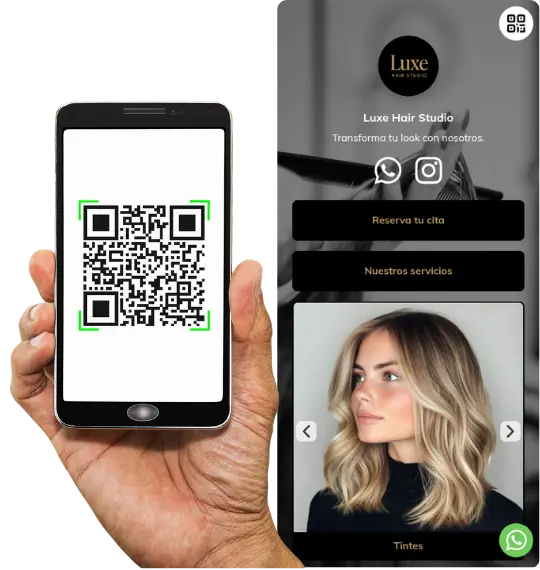
Why businesses use QR code landing pages
A QR code only gets the scan. The landing page behind it is what turns that scan into a clear business action.
Turn scans into WhatsApp messages
Send people straight to WhatsApp with enough context to ask, order, or book faster.
Show menu, services, or products instantly
Help people see what matters right after the scan instead of making them search through a full site.
Guide users to one clear next step
Use one obvious action like message, book, order, call, or get directions.
Update without reprinting the QR
Keep the same QR active while you change content, offers, buttons, or business details behind it.
A QR code landing page is a mobile-optimized page that opens after someone scans a QR code and turns that scan into one clear action, such as sending a WhatsApp message, viewing a menu, booking, checking products, or getting directions. Unlike a full website, it is built for one focused next step and works better for QR traffic.
QR code generator vs QR code landing page
Many businesses think a QR code is enough. But the real difference is what happens after the scan.
Here is the difference between using a simple QR code generator and using a QR code landing page designed for business.
| Feature | QR code generator | QR code landing page (atom.bio) |
|---|---|---|
| Creates QR code | Yes | Yes |
| Controls what users see after scan | No | Yes |
| Mobile-first experience | Depends on destination | Built for mobile |
| WhatsApp and contact actions | No | Yes |
| Menu, services, or catalog | No | Yes |
| Map and directions | No | Yes |
| Forms and lead capture | No | Yes |
| Reviews and trust signals | No | Yes |
| Clear conversion flow | No | Yes |
| Editable after printing QR | Limited | Yes |
| Designed for business use | No | Yes |
If you only need the QR code itself, you can use the free QR code generator for business.
But if you want people to message you, book, order, or visit after scanning, you need a QR code landing page.
What a QR code landing page is and why it converts better
A QR code landing page is a mobile page that opens after scanning a QR code and helps users take immediate action, such as contacting a business, viewing a menu, booking a service, or browsing products.
For most small businesses, a QR code landing page converts better than a homepage because it is focused, mobile-first, and built around one clear action.
The page behind the scan
A QR code gets the scan, but the landing page is what users actually see and act on next.
Built for one immediate action
Use it to guide people to message, book, order, call, or get directions without extra steps.
Useful even without a full website
Many businesses start with a QR landing page first because it is faster to publish and easier to update.
A homepage usually gives people too many paths. QR traffic works better when the destination is short, relevant, and designed for the exact reason someone scanned.
| Comparison point | Homepage | QR code landing page |
|---|---|---|
| User intent | Most homepages are built for general browsing, not for someone who just scanned with a specific purpose in mind. | Built for one specific action after the scan, like message, booking, menu, or directions. |
| Mobile experience | Often broader, heavier, and less focused for someone scanning on a phone. | People scan on their phone, so the page behind the QR should be short, clear, and action-driven. |
| Next step | Visitors usually have to navigate, search, or choose between too many options. | Guide users directly to WhatsApp, booking, menu, catalog, contact, or map actions instead of making them search. |
| Conversion clarity | Good for general brand browsing, but weaker when you want one immediate action from QR traffic. | Better when the goal is to turn scans into messages, visits, bookings, or orders quickly. |
Why atom.bio is different from QR tools
A QR code generator only creates the code. atom.bio helps you control the destination page that converts the scan into messages, bookings, product views, and visits.
If the page behind the QR does not convert, the QR will not either.
Most QR tools stop at the code
Most QR tools stop at link generation. atom.bio focuses on the destination behind the scan and what people do next.
More business features included for free
Use WhatsApp, products, maps, forms, and reviews without hitting paywalls as early as many QR tools do.
Built for menus, bookings, products, and local traffic
Use one page for real business outcomes like menu views, service bookings, product browsing, and local visits.
Update the page without changing the QR
Keep the same printed QR active while you improve the page behind it for new campaigns, offers, hours, or business updates.
What to include in a QR code landing page for business
After scanning a QR code, people expect a fast answer, a clear next step, and a page that helps the business convert that visit.
A high-performing QR code landing page for business usually combines clear content blocks with a few practical business features.
WhatsApp or call buttons
Make it easy to message or call right away after the scan.
Map and directions
Help visitors find your business with map and location buttons.
Menu, services, or pricing
Show the main business information people need after scanning.
Products, offers, or featured items
Display highlights, prices, packs, or offers in one clear mobile layout.
Reviews and trust signals
Add ratings, testimonials, or business proof to build confidence fast.
One clear primary action
Use one dominant next step such as message, order, book, or get directions.
Forms and lead capture
Capture booking requests, inquiries, or leads right after the scan without sending people elsewhere.
Analytics and easy updates
Track what people click and improve wording, buttons, offers, or layouts over time.
If you only need the QR code itself, you can use the free QR code generator for business.
QR code product catalog page. If you need to show products and pricing after the scan, create a catalog page.
simple business website. If the scan needs broader business context, you can create a simple business website.
QR code landing page examples for restaurants, services, and product catalogs
Examples shaped around the exact action people want after scanning
These examples show how businesses use a QR code landing page to guide scans into clear next steps like viewing a menu, checking services, browsing products, or getting in touch.
QR code landing page for restaurants
Show your menu, specials, hours, map, and WhatsApp booking or ordering from table cards, shop windows, or takeaway materials.
QR code landing page for salons and service businesses
Open a page with services, pricing, booking, reviews, and WhatsApp contact for salons, clinics, and local professionals.
QR code landing page for product catalogs
Use QR on packaging, shelves, flyers, or windows to show featured products, prices, and order or contact buttons.
QR code landing page for local business contact
Create a QR page for cards, shop windows, invoices, and flyers with WhatsApp, phone, email, opening hours, and map actions.
How to create a QR code landing page
Creating a QR code landing page is simple when you focus on what users need after scanning.
Step 1
Decide whether the QR should open a menu, WhatsApp chat, booking page, product catalog, contact page, or directions.
Step 2
Add one primary action first, such as WhatsApp, call, booking, order, or directions, then add secondary actions only if needed.
Step 3
Keep the page short, mobile-first, and easy to scan on a phone with large buttons and minimal text above the main CTA.
Step 4
Connect the page to your QR code and print it once across menus, flyers, packaging, tables, or cards.
Step 5
Track visits and clicks, then improve the page based on what people tap.
Why businesses prefer an editable QR landing page
One of the biggest advantages of a QR code landing page is that you can improve what happens after the scan without replacing the printed QR.
Change menu, services, or products anytime
Update your current offer without asking people to scan a new QR.
Edit contact buttons, hours, or offers
Keep the same QR live while you improve the page behind it for current campaigns or business needs.
Print once and reuse across materials
Use one QR on menus, packaging, flyers, tables, business cards, and store windows.
Keep one stable destination behind the scan
Make the page behind your QR more useful over time without reprinting every offline asset.
Print the same QR code once and update the page behind it anytime.
If you need to show products and pricing after the scan, create a catalog page. QR code product catalog page.
If the scan needs broader business context, you can create a simple business website. simple business website.
Where to use a QR code landing page
A QR code landing page is especially useful when people scan from real-world touchpoints and expect one immediate next step.
Menus and tables
Perfect when diners scan to view a menu, place an order, book, or contact the business.
Packaging and labels
Use packaging QR codes to open product details, instructions, offers, or reorder actions.
Shop windows
Help people scan from outside and go straight to WhatsApp, hours, products, or directions.
Flyers and posters
Turn printed promotion into a focused landing page instead of sending traffic to a generic homepage.
Business cards
Use one scan to open contact details, booking buttons, services, or your main business links.
Invoices and receipts
Add post-sale actions like support, repeat orders, review requests, or contact options.
What users say about atom.bio QR pages
Customer feedback from small businesses using atom.bio to turn scans into WhatsApp messages, bookings, and visits.

More WhatsApp inquiries from one QR page
atom.bio helps me show all my services and links in a profile that reflects my brand and connects me with clients. Since I added WhatsApp access, I receive more service inquiries and communicate more easily.
A simple QR landing page for services and messages
I made my atom.bio in a few minutes and now I have one clear page to receive WhatsApp messages, show my services, and share everything from Instagram.

Better product visibility and more sales after the scan
After adding my product links in atom.bio, I noticed more traffic and sales on my website. I recommend it to any business that wants to improve online visibility and conversion.
QR code landing page FAQs
Answers to the most useful questions about QR code landing pages for business.
A QR code landing page is the page that opens after someone scans your QR code. It is designed for mobile and helps people take the next step immediately, like contacting you, viewing a menu, getting directions, or placing an order.
A QR code generator creates the code itself. A QR code landing page controls what people see and do after the scan.
Choose the goal of the scan, add the key actions like WhatsApp or map buttons, keep the page mobile-first, connect it to your QR, and update it anytime as your business changes.
Yes. You can update your QR code landing page anytime and keep the same printed QR active.
Yes. You can generate a QR code and create a landing page for free with atom.bio. Add your content and update it anytime.
Yes. Restaurants often use a QR code landing page for menus, specials, hours, location, and WhatsApp ordering or booking.
Yes. A QR landing page can send people to WhatsApp after they scan, while also showing context like services, products, opening hours, or directions.
Yes. Many businesses start with a QR landing page without building a full website first.
Restaurants, salons, local stores, real estate teams, event booths, and businesses using QR on packaging, flyers, windows, tables, or cards often benefit from one.
Yes. atom.bio includes analytics so you can track visits, clicks, and which actions people take after scanning.
The best page to link to from a QR code is a short, clear, mobile-first page built around one action, such as WhatsApp, a menu, booking, or products. Avoid sending QR traffic to a generic homepage because it usually converts worse than a focused page.
Related pages
Use the right page depending on whether you only need the QR itself or also need a stronger business destination after the scan.
Free QR code generator for business
Create a QR for any existing link when you only need the code itself.
Open free QR code generatorQR code product catalog page
Use a product-first page when the QR should open prices, featured items, and WhatsApp ordering.
Create a QR catalog pageDigital business card with QR code
Share contact details, social links, website, and direct actions from one QR-friendly business card page.
Create a digital business cardSimple business website
Move from one landing page to a fuller website when you need more sections, context, and content depth.
Create a simple websiteCreate your QR page and turn scans into customers
Start free, launch in minutes, and turn more scans into messages, bookings, orders, or visits.
Start your QR landing page for free